Exploring Events in Spring Modulith
In our last article, we discussed the basics of Spring Modulith. At this point we know that Spring Modulith does not magically turn our monolith into a modular monolith. Instead, it provides a set of tests that help us track places where we violate modular design principles, along with a set of tools that help us reduce coupling and increase cohesion in our application. One such tool is — Events.
But before we dive straight into events, let's first cover a few basic concepts that we didn't get to in the last article. This will help us harden our foundation and serves as a quick refresher of where we left off.
Before diving in, I refactored the code to have proper exceptions and a generic base exception.
Services have also been replaced by interfaces, with their implementations moved into internal packages. We made all classes — except the service interfaces themselves — package-private, to enforce the intended architecture.
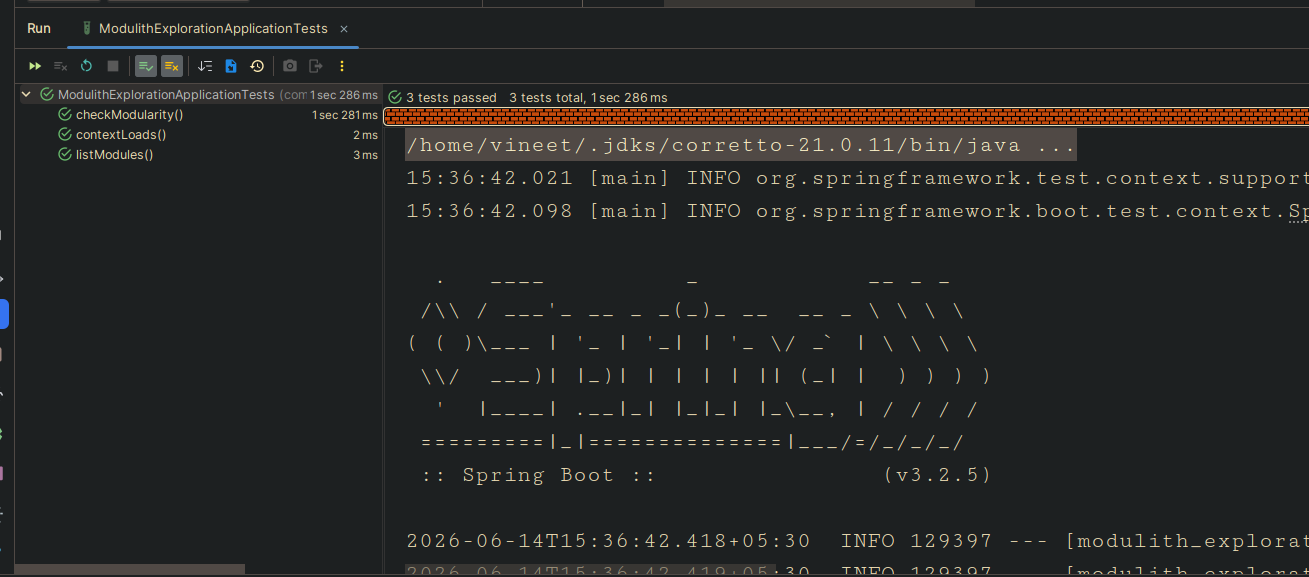
One more improvement: we now expose a public record per domain for cross-domain communication, while keeping the DB entity private to the domain. At this point, all our tests pass!
├── main
│   ├── java
│   │   └── com
│   │       └── wiredbarrack
│   │           └── modulith_exploration
│   │               ├── inventory
│   │               │   ├── internal
│   │               │   │   ├── InventoryDataSeeder.java
│   │               │   │   ├── InventoryEntity.java
│   │               │   │   ├── InventoryMapper.java
│   │               │   │   ├── InventoryRepository.java
│   │               │   │   └── InventoryServiceImpl.java
│   │               │   ├── Inventory.java
│   │               │   └── InventoryService.java
│   │               ├── ModulithExplorationApplication.java
│   │               ├── notifications
│   │               │   ├── internal
│   │               │   │   ├── NotificationDataSeeder.java
│   │               │   │   ├── NotificationEntity.java
│   │               │   │   ├── NotificationMapper.java
│   │               │   │   ├── NotificationRepository.java
│   │               │   │   └── NotificationServiceImpl.java
│   │               │   ├── Notification.java
│   │               │   └── NotificationService.java
│   │               ├── orders
│   │               │   ├── internal
│   │               │   │   ├── OrderDataSeeder.java
│   │               │   │   ├── OrderEntity.java
│   │               │   │   ├── OrderMapper.java
│   │               │   │   ├── OrderRepository.java
│   │               │   │   └── OrderSeviceImpl.java
│   │               │   ├── Order.java
│   │               │   └── OrderSevice.java
│   │               ├── users
│   │               │   ├── internal
│   │               │   │   ├── UserDataSeeder.java
│   │               │   │   ├── UserEntity.java
│   │               │   │   ├── UserMapper.java
│   │               │   │   ├── UserRepository.java
│   │               │   │   └── UserServiceImpl.java
│   │               │   ├── User.java
│   │               │   └── UserService.java
│   │               └── utility
│   │                   └── DatabaseBackupUtility.java
│   └── resources
│       ├── application.yml
│       ├── backup.sql
│       ├── static
│       └── templates
└── test
    └── java
        └── com
            └── wiredbarrack
                └── modulith_exploration
                    └── ModulithExplorationApplicationTests.java
 This works fine if we only have to expose a few DTOs/records per domain. But if a domain needs to expose more than a handful, we'd want a separate package for those DTOs — the problem is that once we move them into a new package, they're no longer part of the public API.
That's where Named Interfaces come to our rescue. With the help of named interfaces, we can mark some sub-packages as public, and thus part of the public API.
Let's create a dto subpackage for each of our domains and move our records there.
├── main
│   ├── java
│   │   └── com
│   │       └── wiredbarrack
│   │           └── modulith_exploration
│   │               ├── inventory
│   │               │   ├── dto
│   │               │   │   └── Inventory.java
│   │               │   ├── internal
│   │               │   │   ├── InventoryDataSeeder.java
│   │               │   │   ├── InventoryEntity.java
│   │               │   │   ├── InventoryMapper.java
│   │               │   │   ├── InventoryRepository.java
│   │               │   │   └── InventoryServiceImpl.java
│   │               │   └── InventoryService.java
│   │               ├── ModulithExplorationApplication.java
│   │               ├── notifications
│   │               │   ├── dto
│   │               │   │   └── Notification.java
│   │               │   ├── internal
│   │               │   │   ├── NotificationDataSeeder.java
│   │               │   │   ├── NotificationEntity.java
│   │               │   │   ├── NotificationMapper.java
│   │               │   │   ├── NotificationRepository.java
│   │               │   │   └── NotificationServiceImpl.java
│   │               │   └── NotificationService.java
│   │               ├── orders
│   │               │   ├── dto
│   │               │   │   └── Order.java
│   │               │   ├── internal
│   │               │   │   ├── OrderDataSeeder.java
│   │               │   │   ├── OrderEntity.java
│   │               │   │   ├── OrderMapper.java
│   │               │   │   ├── OrderRepository.java
│   │               │   │   └── OrderSeviceImpl.java
│   │               │   └── OrderSevice.java
│   │               ├── users
│   │               │   ├── dto
│   │               │   │   └── User.java
│   │               │   ├── internal
│   │               │   │   ├── UserDataSeeder.java
│   │               │   │   ├── UserEntity.java
│   │               │   │   ├── UserMapper.java
│   │               │   │   ├── UserRepository.java
│   │               │   │   └── UserServiceImpl.java
│   │               │   └── UserService.java
│   │               └── utility
│   │                   └── DatabaseBackupUtility.java
│   └── resources
│       ├── application.yml
│       ├── backup.sql
│       ├── static
│       └── templates
└── test
    └── java
        └── com
            └── wiredbarrack
                └── modulith_exploration
                    └── ModulithExplorationApplicationTests.java
I've started consuming the Inventory record in the placeOrder method of OrderServiceImpl. But I can't use it from InventoryRepository directly, since Inventory now lives in a different package and isn't part of the public API.
        Inventory inventory = inventoryService.acquireInventoryItem(order.id(), order.itemCount());
        log.info("Inventory updated for item id : {} with count : {}", inventory.id(), inventory.count());
Note: if we don't call any methods on the Inventory record from OrderServiceImpl, the modularity test will still pass — there's no violation yet. But as soon as we call any method on it (.id(), .count(), etc.), the test fails, because Inventory isn't exposed as part of the public API.
So our modularity test fails with:
org.springframework.modulith.core.Violations: - Module 'orders' depends on non-exposed type com.wiredbarrack.modulith_exploration.inventory.dto.Inventory within module 'inventory'!
Method <com.wiredbarrack.modulith_exploration.orders.internal.OrderSeviceImpl.placeOrder(com.wiredbarrack.modulith_exploration.orders.dto.Order)> calls method <com.wiredbarrack.modulith_exploration.inventory.dto.Inventory.id()> in (OrderSeviceImpl.java:43)
- Module 'orders' depends on non-exposed type com.wiredbarrack.modulith_exploration.inventory.dto.Inventory within module 'inventory'!
Method <com.wiredbarrack.modulith_exploration.orders.internal.OrderSeviceImpl.placeOrder(com.wiredbarrack.modulith_exploration.orders.dto.Order)> calls method <com.wiredbarrack.modulith_exploration.inventory.dto.Inventory.count()> in (OrderSeviceImpl.java:43)

	at org.springframework.modulith.core.Violations.and(Violations.java:144)
	at java.base/java.util.stream.ReduceOps$1ReducingSink.accept(ReduceOps.java:80)
	at java.base/java.util.stream.ReferencePipeline$3$1.accept(ReferencePipeline.java:197)
	at java.base/java.util.HashMap$ValueSpliterator.forEachRemaining(HashMap.java:1787)
	at java.base/java.util.stream.Streams$ConcatSpliterator.forEachRemaining(Streams.java:735)
	at java.base/java.util.stream.AbstractPipeline.copyInto(AbstractPipeline.java:509)
	at java.base/java.util.stream.AbstractPipeline.wrapAndCopyInto(AbstractPipeline.java:499)
	at java.base/java.util.stream.ReduceOps$ReduceOp.evaluateSequential(ReduceOps.java:921)
	at java.base/java.util.stream.AbstractPipeline.evaluate(AbstractPipeline.java:234)
	at java.base/java.util.stream.ReferencePipeline.reduce(ReferencePipeline.java:657)
	at org.springframework.modulith.core.ApplicationModules.detectViolations(ApplicationModules.java:475)
	at org.springframework.modulith.core.ApplicationModules.verify(ApplicationModules.java:440)
	at com.wiredbarrack.modulith_exploration.ModulithExplorationApplicationTests.checkModularity(ModulithExplorationApplicationTests.java:23)
	at java.base/java.lang.reflect.Method.invoke(Method.java:580)
	at java.base/java.util.ArrayList.forEach(ArrayList.java:1596)
	at java.base/java.util.ArrayList.forEach(ArrayList.java:1596)
To overcome this problem, we use named interfaces to expose the Inventory record to other modules.
We add a package-info.java file to the inventory.dto package, exposing the Inventory record to other modules via a named interface:
@org.springframework.modulith.NamedInterface("dto")
package com.wiredbarrack.modulith_exploration.inventory.dto;
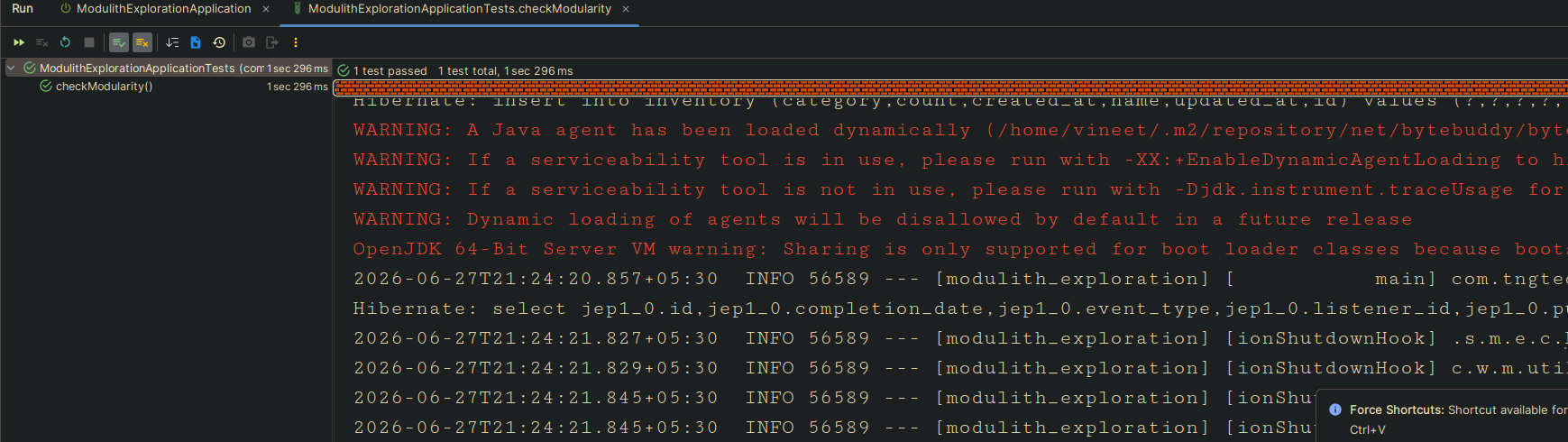
Now, our tests pass:
We can also strictly define the allowed dependencies for a module by adding the @org.springframework.modulith.ApplicationModule annotation's allowedDependencies attribute to the module's package-info.java. For example:
@org.springframework.modulith.ApplicationModule(
        allowedDependencies = {"inventory", "inventory::dto", "notifications"}
)
We still have a problem: our OrderService has a hard dependency on NotificationService (high coupling). This is problematic for two reasons: first, the direct import causes tight coupling; second, it hampers independent testing of OrderService, since we now need to mock NotificationService, and any change to it forces us to touch every module that depends on it.
It also means we'd have to modify OrderServiceImpl itself every time we want to hook new functionality into the "order placed" business event.
To overcome this problem, we can use the ApplicationEvents already provided by Modulith to decouple services
Step 1: Create a new event class OrderPlacedEvent in the orders module, which will be published when an order is placed.
@Getter
@Builder
public class OrderPlaced {
    private Integer id;
}
Step 2: In the OrderServiceImpl class, publish the OrderPlacedEvent when an order is placed.
private final ApplicationEventPublisher events;

...
log.info("Order Placed with id : {}", orderEntity.getId());
events.publishEvent(OrderPlaced.builder().id(orderEntity.getId()).build());
return mapper.toRecord(orderEntity);
...
Before Spring Modulith, developers who wanted to decouple modules but still keep things transactional would reach for vanilla Spring's async event listener pattern:
@Component
class OrderEventListener {

    @Async
    @TransactionalEventListener
    void onOrderPlaced(OrderPlaced event) {
        // This runs AFTER the original transaction commits — good.
        // But what happens if this method throws? Or the JVM crashes before this line runs?
        notificationService.saveNotification("Order placed!");
    }
}
This pattern decouples the original transaction from the notification work — when placeOrder commits, the listener fires asynchronously. That sounds ideal.
But it has a critical flaw: if the listener throws an exception, the event is silently lost. There is no retry, no record, no safety net. The order exists in your database but the notification was never sent, and your system has no way to know that.
To make the listener itself transactional (so it can roll back on failure), you'd add @Transactional with REQUIRES_NEW:
@Component
class OrderEventListener {

    @Async
    @Transactional(propagation = Propagation.REQUIRES_NEW) // its own transaction
    @TransactionalEventListener                             // runs after original tx commits
    void onOrderPlaced(OrderPlaced event) {
        notificationService.saveNotification("Order placed!");
    }
}
This is the correct approach — but it is boilerplate you have to remember to write every single time. Forget REQUIRES_NEW and the listener silently runs outside a transaction. Forget @Async and a slow listener blocks the calling thread.
Spring Modulith solves this with a single annotation @ApplicationModuleListener:
Step 3: In the notifications package, listen for the OrderPlacedEvent and send a notification when the event is received.
@Slf4j
@Component
@RequiredArgsConstructor
class OrderEventListener {

    private final NotificationService notificationService;

    @ApplicationModuleListener
    void onOrderPlaced(OrderPlaced event) {
        log.info("Received OrderPlaced event for order id: {}", event.getId());
        notificationService.saveNotification("Your order has been placed successfully!");
    }
}
@ApplicationModuleListener is a composed annotation that is equivalent to writing all three annotations correctly every time. But it goes further — it plugs into the Event Publication Registry, which is what gives us true durability.
How the Registry Works
When placeOrder calls events.publishEvent(OrderPlaced.builder().id(orderId).build()), Spring Modulith does not just fire and forget. It intercepts the publication and:
- Finds all
@TransactionalEventListener-annotated methods (which includes@ApplicationModuleListener) that are interested in this event type. - Writes one row per listener into a dedicated
event_publicationtable — as part of the same original transaction. If theplaceOrdertransaction rolls back, the publication row is never written either. Event publication and business data are always consistent. - Wraps each listener in an AOP interceptor. When the listener completes successfully, the interceptor marks the row as complete. When the listener throws, the row stays in an incomplete state — ready for retry.
This is the outbox pattern, baked into the framework.
┌──────────────────────────────────────────────────────────┐
│  placeOrder() — @Transactional                            │
│                                                            │
│   1. Save order to DB                                     │
│   2. events.publishEvent(OrderPlaced)  ──────────────┐    │
│                                                       │    │
│   ┌── Modulith intercepts ────────────────────────┐  │    │
│   │  Finds listeners for OrderPlaced              │  │    │
│   │  INSERT INTO event_publication (1 row)        │◄─┘    │
│   └────────────────────────────────────────────────┘      │
│                                                            │
│  COMMIT ─ both order row & publication row committed      │
└──────────────────────────────────────────────────────────┘
            │
            │  After commit
            ▼
┌──────────────────────────────────────────────────────────┐
│  OrderEventListener.onOrderPlaced()  (async, new tx)      │
│                                                            │
│  SUCCESS → UPDATE event_publication SET completion_date=now() │
│  FAILURE → row untouched, completion_date stays NULL      │
└──────────────────────────────────────────────────────────┘
(This is the simplified, pre-2.0 mental model — completion_date is the only signal. Spring Modulith 2.0 introduces a richer Status enum on top of this, which we'll cover later in this article.)
Setting up the Registry
The registry needs a persistence backend. Spring Modulith provides starter POMs for the most common technologies:
| Starter | When to use |
|---|---|
| spring-modulith-starter-jpa | Already using JPA — registry reuses your JPA setup |
| spring-modulith-starter-jdbc | Lighter alternative; bypasses JPA even in JPA apps |
| spring-modulith-starter-mongodb | MongoDB (requires a replica set) |
| spring-modulith-starter-neo4j | Neo4j via Spring Data |
We are using spring-modulith-starter-jpa in this project:
<!-- pom.xml — already in our project -->
<dependency>
    <groupId>org.springframework.modulith</groupId>
    <artifactId>spring-modulith-starter-jpa</artifactId>
    <version>2.0.7</version>
</dependency>
The JPA starter auto-creates the event_publication table on startup (controlled by spring.modulith.events.jdbc.schema-initialization.enabled, defaults to true). Each row stores the serialized event payload as JSON using Jackson — which is why OrderPlaced must be Jackson-serializable (our Lombok-generated getters take care of this).
I have added following tests to verify the working of the above implementation.
@Test
void checkEventListenerForOrderNotification(){
    var modules = ApplicationModules.of(ModulithExplorationApplication.class);

    var ordersModule        = modules.getModuleByName("orders").orElseThrow();
    var notificationsModule = modules.getModuleByName("notifications").orElseThrow();

    // 1. OrderPlaced must be in the orders::dto named interface (part of public API)
    boolean orderPlacedIsPublic = ordersModule.getNamedInterfaces()
            .stream()
            .filter(ni -> "dto".equals(ni.getName()))
            .anyMatch(ni -> ni.contains(OrderPlaced.class));

    org.junit.jupiter.api.Assertions.assertTrue(
            orderPlacedIsPublic,
            "OrderPlaced must be in the orders::dto named interface to be consumable by other modules"
    );

    // 2. notifications module must listen to at least one event from the orders package
    var eventsListenedTo = notificationsModule.getEventsListenedTo(modules);

    boolean listensToOrderEvent = eventsListenedTo.stream()
            .anyMatch(e -> e.getPackageName()
                    .startsWith("com.wiredbarrack.modulith_exploration.orders"));

    org.junit.jupiter.api.Assertions.assertTrue(
            listensToOrderEvent,
            "notifications module must have an @ApplicationModuleListener for an orders event, " +
                    "but currently listens to: " + eventsListenedTo
    );
}
and
@ApplicationModuleTest(ApplicationModuleTest.BootstrapMode.DIRECT_DEPENDENCIES)
class NotificationsModuleTests {

   @Test
   void checkEventListenerForOrderNotification(Scenario scenario) {

       var event = OrderPlaced.builder().id(42).build();

       scenario.publish(event)
               .andWaitForStateChange(() -> event);
   }
}
Durable Events
Now consider a scenario where the listener in the notifications module throws an exception — maybe a downstream dependency it relies on is unavailable. With a plain in-memory event listener, that event would simply be lost: the order exists, but the notification never goes out, and nothing in the system would tell you that.
This is the problem durable events solve. Spring Modulith persists every event publication in the event_publication table as part of the original transaction. If a listener fails, the row for that publication stays incomplete instead of disappearing, so it can be detected and replayed later — either automatically on restart or via the resubmission APIs we'll cover further down.
Enabling Automatic Re-publication on Restart
When the application comes back up after a crash, it can automatically re-deliver any events that were not completed before the shutdown:
# application.yml
spring:
  modulith:
    events:
      republish-outstanding-events-on-restart: true
With this enabled, any event_publication row without a completion date gets re-delivered to its listener on the next application startup.
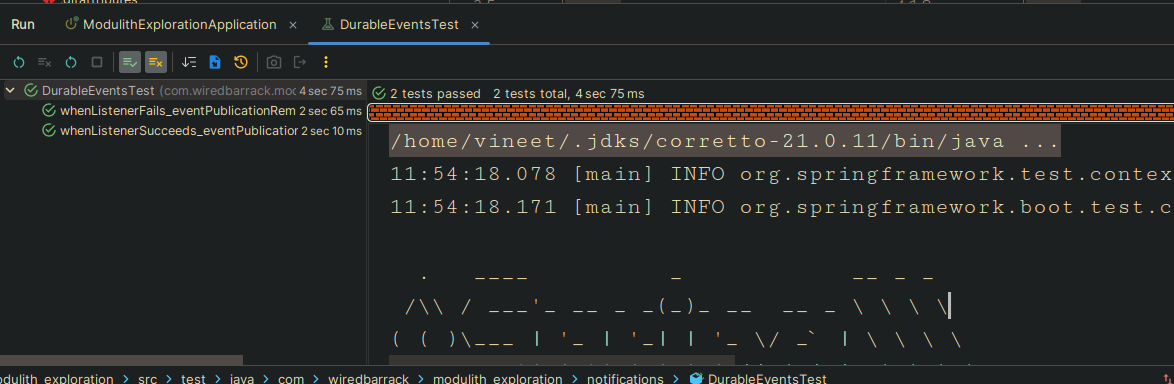
To mimic this flow, let's deliberately throw an exception in the notification service and check what state the event ends up in within event_publication.
@Slf4j
@SpringBootTest
class DurableEventsTest {

    @Autowired
    ApplicationEventPublisher eventPublisher;

    @Autowired
    TransactionTemplate transactionTemplate;

    @Autowired
    JdbcTemplate jdbcTemplate;

    @MockBean
    NotificationService notificationService;

    @BeforeEach
    void setUp() {
        jdbcTemplate.execute("DELETE FROM event_publication");
        reset(notificationService);
    }

    @Test
    void whenListenerFails_eventPublicationRemainsIncomplete() throws InterruptedException {

        when(notificationService.saveNotification(anyString()))
                .thenThrow(new RuntimeException("Simulated notification failure!"));

        transactionTemplate.executeWithoutResult(status ->
                eventPublisher.publishEvent(OrderPlaced.builder().id(1).build()));

        Thread.sleep(2000);

        List<Map<String, Object>> publications = jdbcTemplate.queryForList("SELECT * FROM event_publication");

        logPublicationTable(publications, "FAILURE SCENARIO");

        assertFalse(publications.isEmpty(),
                "event_publication must have at least one row — event was published");

        boolean hasIncompletePublication = publications.stream()
                .anyMatch(row -> row.get("completion_date") == null);

        assertTrue(hasIncompletePublication,
                "completion_date must be null — listener threw, event is pending re-delivery");

        log.info("FAILURE SCENARIO confirmed: event stored safely, completion_date = null, awaiting re-delivery.");
    }

    @Test
    void whenListenerSucceeds_eventPublicationIsMarkedComplete() throws InterruptedException {

        when(notificationService.saveNotification(anyString()))
                .thenReturn(new Notification(99, "Your order has been placed successfully!", "SENT"));

        transactionTemplate.executeWithoutResult(status ->
                eventPublisher.publishEvent(OrderPlaced.builder().id(10).build()));

        Thread.sleep(2000);

        List<Map<String, Object>> publications = jdbcTemplate.queryForList("SELECT * FROM event_publication");

        logPublicationTable(publications, "SUCCESS SCENARIO");

        assertFalse(publications.isEmpty(),
                "event_publication must have at least one row — event was published");

        boolean hasCompletedPublication = publications.stream()
                .anyMatch(row -> row.get("completion_date") != null);

        assertTrue(hasCompletedPublication,
                "completion_date must be set — listener succeeded, event delivery is complete");

        log.info("SUCCESS SCENARIO confirmed: event published, listener ran, completion_date is set.");
    }

    private void logPublicationTable(List<Map<String, Object>> publications, String scenario) {
        log.info("=== event_publication — {} ({} rows) ===", scenario, publications.size());
        for (Map<String, Object> row : publications) {
            log.info("  id              : {}", row.get("id"));
            log.info("  event_type      : {}", row.get("event_type"));
            log.info("  listener_id     : {}", row.get("listener_id"));
            log.info("  publication_date: {}", row.get("publication_date"));
            log.info("  completion_date : {}", row.get("completion_date")); // null = not delivered yet
            log.info("  serialized_event: {}", row.get("serialized_event"));
            log.info("  ----");
        }
    }
}
What "Status" Actually Means Pre-2.0
Up through Spring Modulith 1.x, the event_publication table doesn't store a status enum like PUBLISHED/PROCESSING/COMPLETED/FAILED. It's simpler than that — it just tracks incomplete vs. completed via a single nullable timestamp column.
Inferring the "status" of an event publication is purely based on completion_date:
| State | Meaning |
|---|---|
| completion_date IS NULL | Incomplete — either still processing, never got picked up, or threw an exception that wasn't handled by a retry/completion mechanism |
| completion_date IS NOT NULL | Completed — the listener finished successfully |
There's no FAILED row state in the table itself in this model. If a listener throws an exception:
- By default, the row stays incomplete (
completion_datestaysNULL), and the configured retry mechanism decides whether to pick it up again on the next republish. - There's no separate persisted "this failed" marker — incomplete is the failed/pending signal, and Modulith can't distinguish "still mid-processing right now" from "errored and waiting for retry" just by looking at the row. That distinction lives in your application logs and exception handling, not the table.
The Richer Lifecycle Introduced in Modulith 2.0
Spring Modulith 2.0 closes this gap. It adds a status column, along with completion_attempts and last_resubmission_date, giving each publication a proper lifecycle that you can query and reason about directly — instead of inferring everything from a single nullable timestamp.
The image below shows the event lifecycle as of 2.0:
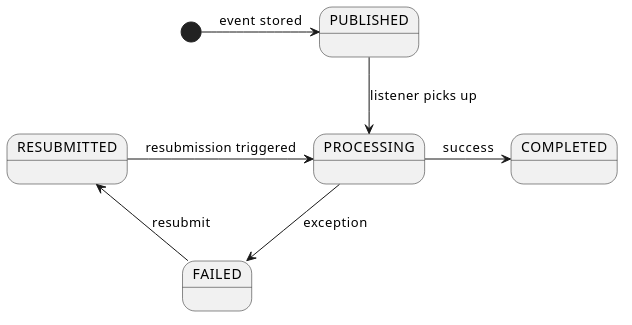 Source: Spring Modulith reference docs
Publication states
Each event publication now has an EventPublication.Status:
| Status | Meaning |
|---|---|
| PUBLISHED | The publication was stored and is waiting to be processed (or is about to be picked up). |
| PROCESSING | A listener has claimed the publication and is executing. The interceptor around the listener sets this before invoking the listener, and sets it to COMPLETED or FAILED once the listener returns. |
| COMPLETED | The listener finished successfully. A completion date is set (unless the completion mode is DELETE). |
| FAILED | The listener threw an exception, or the publication was marked failed by the staleness mechanism (see below). |
| RESUBMITTED | A previously failed publication was resubmitted and is again pending processing. |
Event Publication Staleness and Automatic Failure Marking
Consider a scenario: the JVM crashes in the middle of OrderEventListener.onOrderPlaced(). The row is in PROCESSING. The application restarts.
Without staleness detection, this row stays in PROCESSING forever. You cannot safely resubmit it — you do not know if it's still running somewhere (it's not, but the database does not know that) or if it crashed.
Spring Modulith 2.0 introduces a Staleness Monitor — a background scheduled task that looks for rows stuck in PUBLISHED, PROCESSING, or RESUBMITTED that are older than a configured threshold, and marks them FAILED. Once they are FAILED, you can safely resubmit them.
Configure the thresholds in application.yml:
spring:
  modulith:
    events:
      staleness:
        published: 10m    # rows stuck in PUBLISHED for > 10 min → mark FAILED
        processing: 5m    # rows stuck in PROCESSING for > 5 min → mark FAILED
        resubmitted: 10m  # rows stuck in RESUBMITTED for > 10 min → mark FAILED
Note: If all three values are zero (the default), the Staleness Monitor does not register its scheduled task at all — no overhead for applications that don't need it.
The interval at which the monitor runs defaults to the minimum of the configured staleness durations. You can override it explicitly if needed.
Also, @EnableScheduling is required for Spring Modulith's Staleness Monitor to register .Its background task. The monitor periodically marks stuck event publications as FAILED.
@SpringBootApplication
@EnableScheduling
public class ModulithExplorationApplication {

	public static void main(String[] args) {
		SpringApplication.run(ModulithExplorationApplication.class, args);
	}

}
Working with Failed Publications: The Resubmission API
The spring-modulith-events-api artifact exposes three Spring beans that let you manage event publications programmatically. Add it to your pom.xml:
<!-- pom.xml -->
<dependency>
    <groupId>org.springframework.modulith</groupId>
    <artifactId>spring-modulith-events-api</artifactId>
    <version>2.0.7</version>
</dependency>
The three beans:
| Bean | Purpose |
|---|---|
| FailedEventPublications | Resubmit only FAILED publications |
| IncompleteEventPublications | Resubmit any incomplete publication (failed, stale, etc.) |
| CompletedEventPublications | Access and purge completed publications |
Resubmitting Failed Events
@Component
@RequiredArgsConstructor
class EventHousekeeping {

    private final FailedEventPublications failedEventPublications;
    private final IncompleteEventPublications incompleteEventPublications;
    private final CompletedEventPublications completedEventPublications;

    // Call this on a schedule, or from an admin endpoint
    void resubmitFailed() {
        // Resubmit all failed publications, up to 10 at a time
        failedEventPublications.resubmit(
            ResubmissionOptions.defaults()
                .withBatchSize(10)
        );
    }

    void resubmitOldIncomplete() {
        // Resubmit incomplete publications that are at least 5 minutes old
        incompleteEventPublications.resubmitIncompletePublications(
            ResubmissionOptions.defaults()
                .withMinAge(Duration.ofMinutes(5))
        );
    }

    void purgeOldCompleted() {
        // Delete completed event_publication rows older than 1 hour to keep the table lean
        completedEventPublications.deletePublicationsOlderThan(Duration.ofHours(1));
    }
}
ResubmissionOptions in Detail
ResubmissionOptions is a builder that controls exactly how resubmission works:
ResubmissionOptions options = ResubmissionOptions.defaults()
    .withBatchSize(20)                            // process at most 20 at a time
    .withMinAge(Duration.ofMinutes(10))           // only consider publications older than 10 min
    .withFilter(pub ->                            // custom predicate
        pub.getCompletionAttempts() < 3           // stop after 3 tries
    );
When resubmission runs:
- The row transitions:
FAILED→RESUBMITTED last_resubmission_dateis set to now- The listener is invoked again asynchronously
- The row transitions:
RESUBMITTED→PROCESSING(attempt count incremented) →COMPLETEDorFAILED
Completion Modes
Event Publication Completion Modes
By default, when a listener completes successfully, Modulith sets completion_date on the row and leaves it in the table. This means your event_publication table grows unboundedly unless you purge it manually.
Modulith provides three completion modes via spring.modulith.events.completion-mode:
| Mode | Behaviour | Use when |
|---|---|---|
| UPDATE (default) | Sets completion_date on success. Row stays. Manual purge required. | You need to audit completed events |
| DELETE | Deletes the row on success. Nothing to purge. CompletedEventPublications returns empty. | You only care about failures |
| ARCHIVE | On success: copies row to event_publication_archive table with completion_date set, then deletes the original row. Completed events still queryable via CompletedEventPublications. | You want audit trail but a lean active table |
Configure in application.yml:
spring:
  modulith:
    events:
      completion-mode: DELETE   # or UPDATE (default) or ARCHIVE
Demonstrating DELETE mode
If you switch to DELETE mode and run the success scenario in DurableEventsTest, the event_publication table will be empty after the listener succeeds:
@Test
void whenCompletionModeIsDelete_tableIsEmptyAfterSuccess() throws InterruptedException {
    // With spring.modulith.events.completion-mode=DELETE in test config:

    when(notificationService.saveNotification(anyString()))
        .thenReturn(new Notification(99, "OK", "SENT"));

    transactionTemplate.executeWithoutResult(status ->
        eventPublisher.publishEvent(OrderPlaced.builder().id(10).build()));

    Thread.sleep(2000);

    List<Map<String, Object>> publications =
        jdbcTemplate.queryForList("SELECT * FROM event_publication");

    // With DELETE mode — the row is gone after successful delivery
    assertTrue(publications.isEmpty(),
        "With DELETE completion mode, completed publications are removed immediately");
}
Rule of thumb: Use
DELETEduring development for a clean slate between runs. UseUPDATEorARCHIVEin production for observability.
Event Serialization
How Events Are Serialized
Each row in event_publication stores the full event object as JSON in the serialized_event column. You can see this in the output of our DurableEventsTest:
serialized_event: {"id":1}
Spring Modulith uses Jackson by default (JacksonEventSerializer), which is automatically configured from your application's ObjectMapper. Our OrderPlaced class is serializable because Lombok's @Data generates the required getters:
@Builder
@Data
@AllArgsConstructor
@NoArgsConstructor
public class OrderPlaced {
    private Integer id;
}
What this means for you:
- Any field in your event class must be Jackson-serializable
- Avoid putting JPA entities directly in events — use IDs or dedicated event records instead
- If you need custom serialization, implement
EventSerializerand register it as a@Bean
Customizing the publication timestamp:
By default, Modulith timestamps publications using Clock.systemUTC(). In tests, you might want a fixed clock:
@TestConfiguration
class EventTestConfig {
    @Bean
    Clock testClock() {
        return Clock.fixed(Instant.now(), ZoneOffset.UTC);
    }
}
Testing with PublishedEvents
Testing Events from the Publisher's Side
The Scenario API (which we used in NotificationsModuleTests) tests event consumption — you publish an event and verify the state change. But sometimes you want to test from the publisher's side: verify that placing an order actually fires the correct event.
Spring Modulith's @ApplicationModuleTest supports two special test method parameters for this:
Option A: PublishedEvents
// Add to: src/test/java/com/wiredbarrack/modulith_exploration/orders/OrdersModuleTests.java

package com.wiredbarrack.modulith_exploration.orders;

import com.wiredbarrack.modulith_exploration.orders.dto.Order;
import com.wiredbarrack.modulith_exploration.orders.dto.OrderPlaced;
import org.junit.jupiter.api.Test;
import org.springframework.beans.factory.annotation.Autowired;
import org.springframework.modulith.test.ApplicationModuleTest;
import org.springframework.modulith.test.PublishedEvents;

import static org.assertj.core.api.Assertions.assertThat;

@ApplicationModuleTest
class OrdersModuleTests {

    @Autowired
    OrderSevice orderService;

    @Test
    void placeOrder_publishesOrderPlacedEvent(PublishedEvents events) {
        // Arrange
        var order = new Order(null, 1, "PENDING", 2);

        // Act
        orderService.placeOrder(order);

        // Assert — verify the event was published with the right data
        var published = events.ofType(OrderPlaced.class)
                .matching(OrderPlaced::getId, id -> id != null);

        assertThat(published).hasSize(1);
    }
}
PublishedEvents captures all events published during the test method's execution. The ofType(…).matching(…) chain lets you filter by event type and field values.
Option B: AssertablePublishedEvents (fluent AssertJ style)
If you are already using AssertJ in your tests, AssertablePublishedEvents gives you a more expressive syntax:
@Test
void placeOrder_publishesOrderPlacedEvent(AssertablePublishedEvents events) {
    var order = new Order(null, 1, "PENDING", 2);
    orderService.placeOrder(order);

    assertThat(events)
        .contains(OrderPlaced.class)
        .matching(OrderPlaced::getId, id -> id != null);
}
The difference is purely stylistic — AssertablePublishedEvents folds the assertion into the fluent assertThat(events) chain so you do not need a separate variable.
Key points:
- Both are injected at the test method level (as parameters), not the class level
- They only capture events published during that specific test method's execution
- They complement the
ScenarioAPI: useScenarioto test listeners (consumer side), usePublishedEventsto test publishers (producer side)
Event Externalization
Externalizing Events to Message Brokers
Everything we have covered so far is about events within the JVM — one module talking to another in the same process. But what if an external system needs to react to an OrderPlaced event? A shipping service, an analytics pipeline, a third-party notification provider?
This is where event externalization comes in. Spring Modulith lets you publish selected events to a message broker (Kafka, RabbitMQ, JMS, etc.) with the same durability guarantees as internal events — because externalization is implemented as a @TransactionalEventListener, which means the Event Publication Registry tracks it too.
The Three Steps of Externalization
When an event is published, Modulith performs three steps to externalize it:
Step 1 — Event Selection: Is this event supposed to leave the JVM?
By default, only events annotated with @Externalized are selected.
Step 2 — Message Preparation (optional): Transform the event into a payload suitable for external consumers. You might strip internal fields or map to a different DTO.
Step 3 — Routing: Where does the message go? Each broker has its own concept (topic, exchange, queue). Modulith derives a default target from the class name: for a base package of com.wiredbarrack.modulith_exploration, an event orders.dto.OrderPlaced would publish to orders.dto.OrderPlaced by default.
Available Broker Adapters
| Artifact | Broker | Routing |
|---|---|---|
| spring-modulith-events-kafka | Apache Kafka | Routing key → Kafka topic and message key |
| spring-modulith-events-amqp | RabbitMQ / any AMQP | Routing key → AMQP routing key |
| spring-modulith-events-jms | JMS | No routing keys supported |
| spring-modulith-events-messaging | Spring Integration / Messaging | Target resolves to a MessageChannel bean name |
Add the relevant artifact to your pom.xml and the auto-configuration takes over.
Annotation-Based Configuration with @Externalized
The simplest way to externalize an event is to annotate it with @Externalized:
// Simplest form — target is derived automatically from the class name
@Externalized
public class OrderPlaced {
    private Integer id;
}
To specify an explicit topic and a routing key, use the target::key pattern. Both sides support SpEL expressions where #this refers to the event instance:
// Publish to the "orders.placed" topic, with the order ID as the routing key
@Externalized("orders.placed::#{#this.getId()}")
public class OrderPlaced {
    private Integer id;
}
For routing key logic that is too complex for a single expression, delegate to a Spring bean:
// Delegate key calculation to a bean
@Externalized("orders.placed::#{@orderRoutingStrategy.keyFor(#this)}")
public class OrderPlaced {
    private Integer id;
}

@Component("orderRoutingStrategy")
class OrderRoutingStrategy {
    public String keyFor(OrderPlaced event) {
        // any logic here
        return "order-" + event.getId();
    }
}
Programmatic Configuration with EventExternalizationConfiguration
For full control over selection, mapping, and routing, register an EventExternalizationConfiguration bean:
@Configuration
class ExternalizationConfig {

    @Bean
    EventExternalizationConfiguration eventExternalizationConfiguration() {
        return EventExternalizationConfiguration.externalizing()
            // (1) Which events to externalize
            .select(EventExternalizationConfiguration.annotatedAsExternalized())
            // (2) Map OrderPlaced to a leaner external DTO before sending
            .mapping(OrderPlaced.class, event ->
                new ExternalOrderEvent(event.getId(), Instant.now())
            )
            // (3) Use the order ID as the routing/partition key
            .routeKey(OrderPlaced.class, e -> String.valueOf(e.getId()))
            .build();
    }
}

// The leaner DTO for external consumers — no internal fields exposed
record ExternalOrderEvent(Integer orderId, Instant occurredAt) {}
This approach is useful when:
- You want to control exactly which fields external consumers see
- Your routing key requires transformation logic
- You want to add broker-specific headers to the message
Serialization Safety: Serialize Externalization
Externalization runs as a transactional event listener, which means multiple threads can be sending to the broker concurrently — especially when resubmitting a backlog of failed publications. This can cause ordering issues at the broker.
To enforce serial execution (one event sent at a time), set:
spring:
  modulith:
    events:
      externalization:
        serialize-externalization: true
This adds a lock so that only one externalization interaction with the broker happens at a time. Use this when event ordering at the broker matters or when you are resubmitting large backlogs.
A Note on Externalization and the Registry
This is the elegant part: externalization is just another transactional event listener. This means:
- A row is written to
event_publicationfor the externalization listener, just like for internal listeners - If the broker is unavailable and the send fails, the row stays
FAILED - You can resubmit failed external event publications using the same
FailedEventPublicationsAPI described above - The same staleness detection, completion modes, and resubmission options apply
There is no separate outbox table or mechanism to learn. The same durable event pattern that guards internal module communication guards external broker communication too.
Quick Reference: Configuration Properties
spring:
  modulith:
    events:
      # Re-deliver incomplete events on application restart
      republish-outstanding-events-on-restart: true

      # What to do with completed event_publication rows
      # UPDATE (default) | DELETE | ARCHIVE
      completion-mode: UPDATE

      # Mark stuck publications as FAILED after these durations
      staleness:
        published: 10m
        processing: 5m
        resubmitted: 10m

      # JDBC schema auto-creation (set false if using Flyway/Liquibase)
      jdbc:
        schema-initialization:
          enabled: true

      # Externalization
      externalization:
        serialize-externalization: false  # true = one broker send at a time
Quick Reference: Dependency Additions to pom.xml
<!-- For the resubmission API (FailedEventPublications, CompletedEventPublications, etc.) -->
<dependency>
    <groupId>org.springframework.modulith</groupId>
    <artifactId>spring-modulith-events-api</artifactId>
    <version>2.0.7</version>
</dependency>

<!-- For Kafka externalization (add alongside spring-modulith-events-api, not instead of it) -->
<dependency>
    <groupId>org.springframework.modulith</groupId>
    <artifactId>spring-modulith-events-kafka</artifactId>
    <version>2.0.7</version>
</dependency>

<!-- For RabbitMQ/AMQP externalization -->
<dependency>
    <groupId>org.springframework.modulith</groupId>
    <artifactId>spring-modulith-events-amqp</artifactId>
    <version>2.0.7</version>
</dependency>
`